Nutrition Lab

Turn nutrition targets into a plan you can actually use.

Set useful starting targets, build the week, turn each day into meals, organize preparation and shopping, and review progress before changing the plan.

Free NeuForm account required. Saved planning is browser-local and available with Pro.

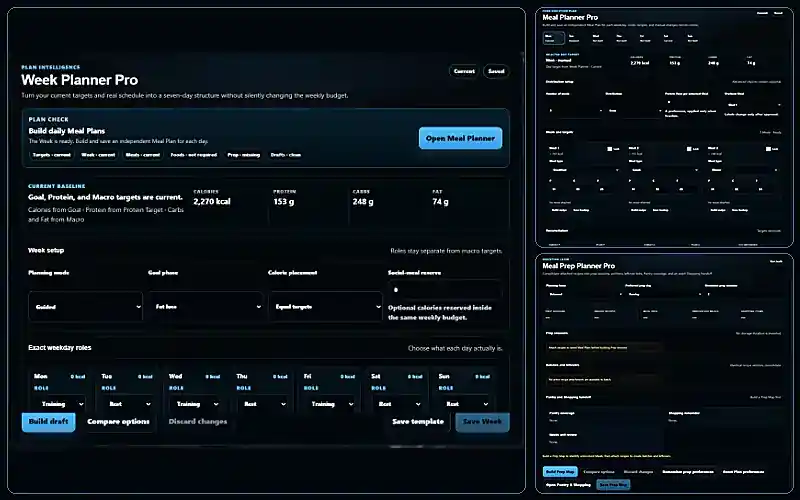
Nutrition Lab Week Planner, daily Meal Plans, and Meal Prep Planner working as one connected planning system
Actual Nutrition Lab planning interface. Example values are illustrative and depend on the user’s inputs.
Start with real Free access Five target tools, Progress entry, and an interactive planning preview.
Build beyond the estimate Move from targets into a week, daily meals, preparation, recipes, Pantry, and Shopping.
You keep authority Drafts and suggestions do not replace the current plan until you deliberately save or accept them.

From a starting target to the next useful decision.

Nutrition Lab connects the steps that are usually scattered across calculators, notes, meal-planning apps, and spreadsheets.

01 · Set the starting point

Use traceable targets.

Set TDEE, Goal, Protein, Macro, and Hydration while keeping assumptions and limits visible.

02 · Build the week

Shape seven realistic days.

Account for training, rest, planned flexibility, and the weekly energy budget.

03 · Plan meals and preparation

Turn each day into action.

Create daily Meal Plans, attach recipes, and organize preparation, leftovers, Pantry, and Shopping.

04 · Review before changing

Use evidence, not one noisy day.

Review check-ins and trends before deciding whether to hold, investigate, or consider an adjustment.

Five workspaces that move one plan forward.

Start with Targets. Open the other workspaces only when they solve the next real problem.

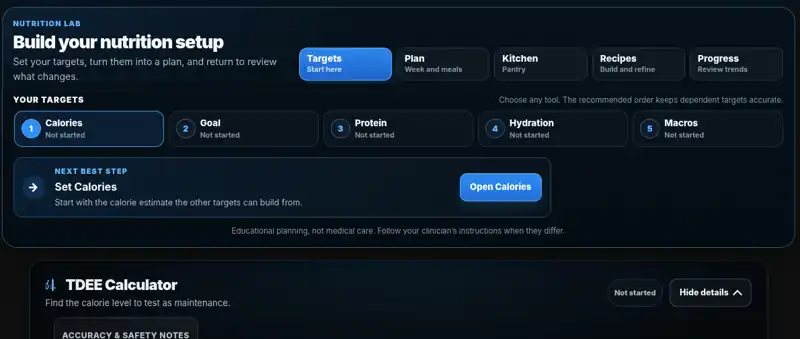
Nutrition Lab Targets workspace with TDEE, Goal, Protein, Hydration, and Macro tools
Targets workspace. Example values are illustrative.
Free

Set a starting point you can revisit.

Set TDEE, Goal, Protein, Macro, and Hydration targets while keeping inputs, assumptions, and review needs visible.

Passes forward: current daily targets and setup context.

Nutrition Lab Week Planner, daily Meal Plans, and Meal Prep Planner
Plan workspace. Example values are illustrative.
Free preview · Pro saves

Build the week, each day, and the Prep Map.

Shape the seven-day structure, store an independent Meal Plan for each day, and turn attached recipes into practical preparation sessions.

Uses: current targets. Passes forward: saved Week, Meal, and Prep Plans.

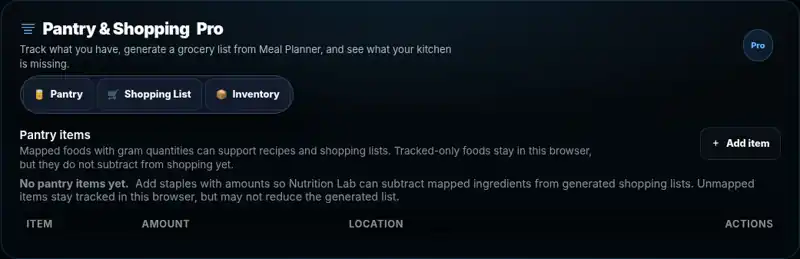
Nutrition Lab Pantry and Shopping workspace
Kitchen workspace. Example values are illustrative.
Pro

Compare the plan with what is available.

Use Pantry context to understand what is covered, what remains uncertain, and what should move into Shopping.

Uses: active plans and recipes. Passes forward: Pantry coverage and Shopping remainder.

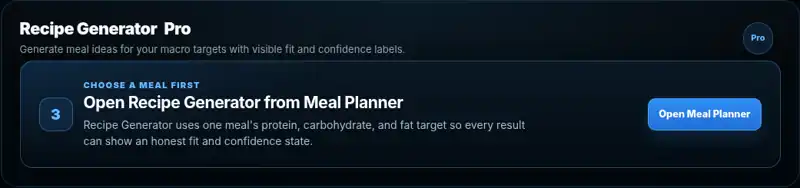
Nutrition Lab Recipe Generator opened from a planned meal target
Recipes workspace. Example values are illustrative.
Pro

Generate, review, substitute, and attach.

Build around the meal target, diet and allergen settings, exclusions, and available food. Review, replace, or reject the result.

Uses: a Meal Plan target. Passes back: a reviewed recipe attachment.

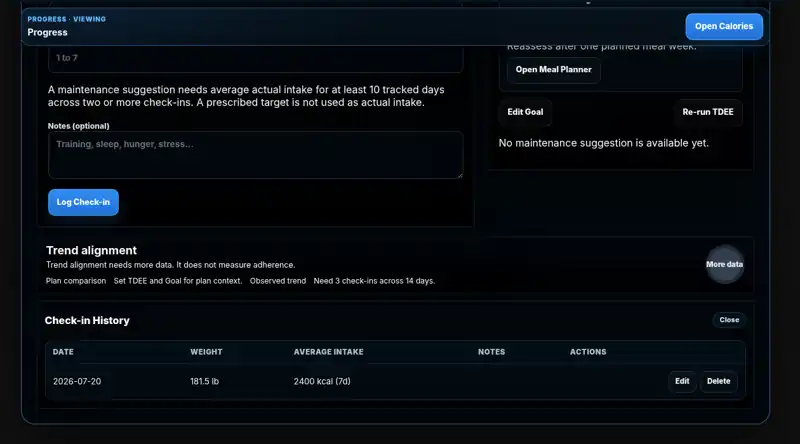
Nutrition Lab Progress workspace with check-in history and trend review
Progress workspace. Example values are illustrative.
Free entry · Pro review depth

Review evidence before changing the plan.

Log check-ins, review trends, and keep suggestions separate from the current target until you deliberately approve a change.

Uses: check-ins and actual intake evidence. Returns: hold, review, or an eligible suggestion.

Designed to change the right thing, not everything.

Nutrition Lab keeps valid work intact, shows what needs review, and makes uncertainty visible instead of hiding it.

Protects the weekly total

When calories move between flexible days, the weekly result remains visible instead of pretending nothing changed.

Baseline week15,890 kcal
Planned weekBudget preserved

Limits the effect of an edit

Changing Tuesday can make Tuesday’s meals stale without invalidating the entire week.

Tuesday target changedTuesday review
Monday PlanStill current

Stops when the answer is not responsible

Missing quantities, unresolved exclusions, or unsupported food data remain review needs rather than becoming false precision.

Usable food and quantityReady
Unresolved boundaryStops safely
5 workspacesTargets, Plan, Kitchen, Recipes, and Progress
3 planning layersWeek, independent daily meals, and preparation
No silent changesSuggestions remain separate until deliberately accepted
Browser-localSaved Lab state remains here unless exported

Built for the week that actually happens.

A moved workout, restaurant meal, missed preparation session, or changed schedule should not force you to rebuild the entire plan.

Training moved

Update the day and review only the meals and preparation affected by the new schedule.

A social meal was added

Reserve what you know, estimate what you do not, and keep the remaining daily and weekly impact visible.

There was no time to cook

Use a backup meal, swap one recipe, or retain a clear manual exception without rewriting your targets.

Preparation did not happen

Keep the valid plan, identify unresolved meals, and rebuild only the preparation that is still needed.

Tuesday changedNeeds review
Monday unchangedStill current
Weekly budgetPreserved

Start free. Upgrade when saving the system becomes useful.

Free helps you establish the starting point and test the workflow. Pro lets you save, revise, and carry the connected system forward.

Nutrition Lab Free
$0

Use the core target tools, enter Progress data, and test the planning workflow before paying for persistence.

  • All five target tools
  • Progress entry and recent data
  • Interactive Week, Meal, and Prep preview
  • Ability to test the connected workflow
  • Export of permitted Free data

Free planning previews do not persist.

Nutrition Lab Pro
$9 per month

Save and revise the connected planning, food, and Progress workflows when repeated use becomes valuable.

  • Saved and editable Week Plans
  • Independent saved daily Meal Plans
  • Saved Prep Maps, batches, and leftovers
  • Recipes, Pantry, and Shopping
  • Longer Progress history and supported review guidance

Recurring subscription. Saved Lab state remains browser-local unless exported.

Swipe horizontally to compare.

Nutrition Lab Free and Pro feature comparison
CapabilityFreePro
TargetsAll five toolsIncluded
PlanningInteractive previewSave and revise Week, Meal, and Prep Plans
RecipesProduct preview and entry pointsGenerate, review, attach, replace, and save
Pantry and ShoppingNot includedConnected workflow
ProgressEntry and recent dataLonger history and supported review depth
NeuForm Nutrition Fundamentals 2026 Digital Edition cover
One-time nutrition education

Want the complete system behind the targets?

Nutrition Lab helps you calculate, plan, and review. NeuForm Nutrition Fundamentals teaches the complete evidence-based system behind energy targets, protein, macros, hydration, training fuel, meal structure, and real-world adjustments.

  • $34.99 one time
  • Searchable 2026 Digital Edition
  • Personal-use My Library access
  • Paperback sold separately
Trust boundaries

Useful because the limits stay visible.

The boundaries are part of the product, not fine print added after the answer.

Browser-local saved state

Your account controls access, but saved Lab state remains in the current browser unless exported.

Estimates remain estimates

Targets and trends keep assumptions, freshness, uncertainty, and review needs visible.

You approve durable changes

Drafts, generated results, and suggestions remain separate until you deliberately save or accept them.

Educational, not clinical

Nutrition Lab supports general fitness planning. It does not replace diagnosis, treatment, or medical nutrition therapy.

Questions before you start

Nutrition Lab questions

Clear answers about Free access, Pro, browser-local data, billing, and safe use.

Is Nutrition Lab free?

Yes. A free NeuForm account opens all five target tools, Progress entry, and an interactive preview of the Week, Meal, and Prep workflow.

What does Nutrition Lab Pro add?

Pro adds saved and editable planning, Recipes, Pantry, Shopping, longer Progress history, and the ability to carry repeated workflows forward.

What does Pro cost?

Nutrition Lab Pro is $9 per month. Open Nutrition Lab to review the current account and billing options available to you before purchase.

How do I upgrade, manage, or cancel?

Use the account controls inside Nutrition Lab to review upgrade and billing management. Open Support when the expected control is unavailable.

Does the Free planning preview save?

No. The Free Week, Meal, and Prep preview is interactive but nonpersistent. Pro is required to save those planning workflows.

Where is my Nutrition Lab data stored?

Permitted saved Lab state remains in the current browser. Clearing site data, using private browsing, or moving to another browser or device can remove or separate that state. Export a backup when needed.

Can Nutrition Lab automatically change my targets?

No. Progress can surface an eligible suggestion, but it remains separate from the current target until you deliberately review and accept it.

Does Nutrition Lab replace medical nutrition advice?

No. Nutrition Lab supports general fitness planning and educational estimates, not diagnosis, treatment, or medical nutrition therapy.

Start with what solves the problem

Start with the smallest nutrition setup that helps.

Use Nutrition Lab Free for targets and a practical first workflow. Add Pro only when saving and repeating the connected system becomes useful.